![Fifty - Logo&baseline_blackBackground_2023.png]](https://knowledge.fifty.do/hs-fs/hubfs/Fifty%20-%20Logo%26baseline_blackBackground_2023.png?height=50&name=Fifty%20-%20Logo%26baseline_blackBackground_2023.png)
-
See the following section for instructions on how to connect to the Fifty platform and start using it.
Once your Customer Success Manager has assigned you rights, you can log in to the Fifty platform.
Step 1
From a computer, go to www.app.fifty.do.
Please note that the management platform is only accessible from a computer.
Step 2
Choose the interface language: French or English.
Step 3
Enter your work email address (the one you used to register).
Step 4
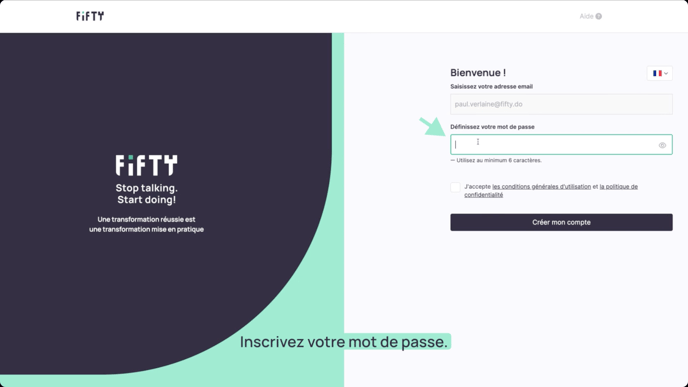
Create your password:
It must contain at least 6 characters.
You can use:
• lowercase and uppercase letters
• numbers (0 to 9)
• special characters (#@&()^…)
Step 5
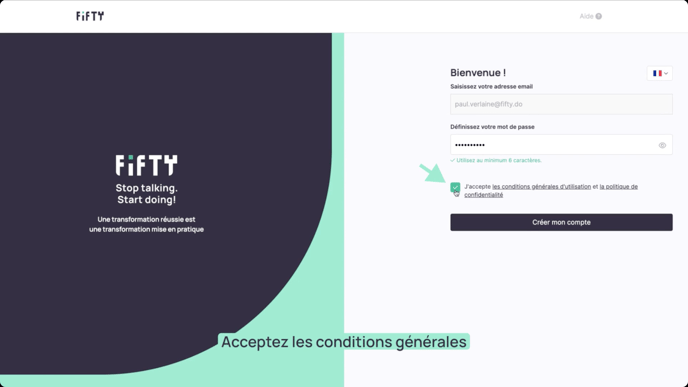
Tick the box to accept the terms and conditions of use.
Step 6
Click on ‘Create my account’.
Step 7
Welcome to your Fifty management platform!