![Fifty - Logo&baseline_blackBackground_2023.png]](https://knowledge.fifty.do/hs-fs/hubfs/Fifty%20-%20Logo%26baseline_blackBackground_2023.png?height=50&name=Fifty%20-%20Logo%26baseline_blackBackground_2023.png)
🔧 Step 1: Access settings
From the main menu (left column), click on ⚙️ Settings.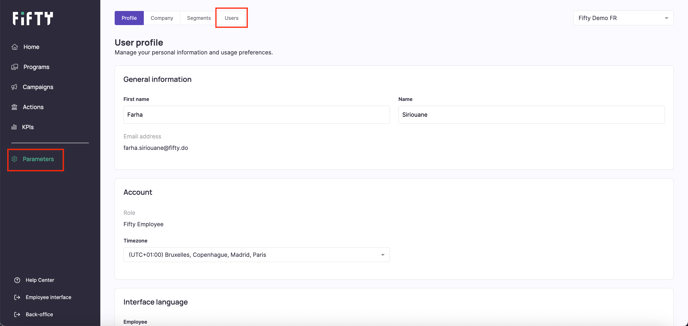
👤 Step 2: Manage users
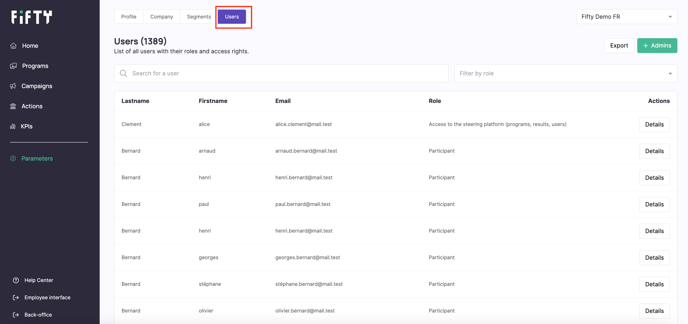
In the Settings tab, click on Users to access the list of existing accounts.
➕ Step 3: Add an administrator
Click on the Add an administrator button at the top right of the page.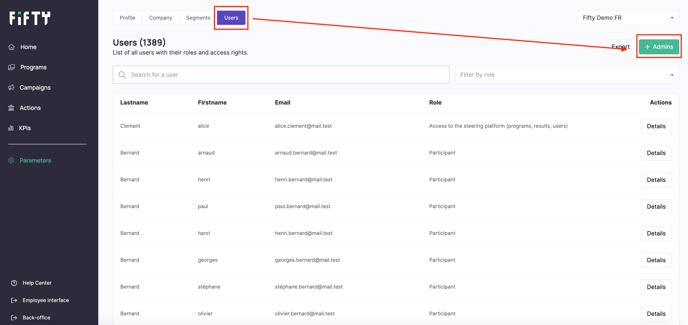
✉️Step 4: Enter the email address
Enter the work email address of the person you want to give administrative rights to.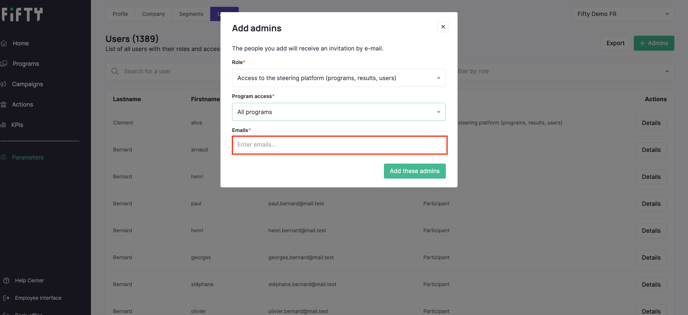
🛠️ Step 5: Define access rights
Customize access rights according to three criteria:
1- Access scope:
A specific program
All programs
2- Type of accessible data:
Only proposed actions
Only results (KPIs)
All data: action programs, KPIs, users
3- Access to the user list:
Yes / No
💡 Tip: Adjust the level of rights according to the administrator's role (local manager, HR, sponsor, etc.).